Best Shopify Product Customizer Apps for Merchants (2026)
Compare Podifai vs Zakeke, Customily, Kickflip, Globo & Teeinblue on pricing, live preview & use case (apparel, jewelry, mugs, enterprise). 2026.
The best Shopify app for product customization depends on what you sell and how your customers interact with your products. For stores that need real-time visual previews — like jewelry shops, gift stores, or apparel brands — apps like Podifai and Zakeke offer live 2D preview. For print-on-demand businesses, Customily or Teeinblue are better fits. For multi-component product configuration with inventory management, CPB and Zepto stand out. And if you just need basic product options without visual previews, Globo Product Options gets the job done at the lowest cost.
That's the short answer. Here's the full breakdown — with verified pricing, real user reviews, and the data behind why customization matters.
Skip the comparison and try Podifai's Free forever plan. It includes live preview, conditional logic, and add-on pricing for up to 3 custom products. Starter supports up to 30 products and Growth supports unlimited products, with no transaction fees or order caps. Install Podifai free →
Why product customization matters for Shopify stores in 2026
A product customization app lets shoppers enter text, upload images or choose options before buying. A live preview can show supported choices on the product image. The effect on order value and conversion depends on the store, product, implementation and traffic; this guide does not establish a measured revenue uplift.
Research on personalized marketing is not a controlled test of product-customizer apps. Evaluate your own completed purchases, order value, returns and production errors before and after a change, while accounting for changes in traffic and product mix.
"Customers have high expectations for their favorite brands, and online marketplaces have never been more important. Brands that are able to predict the desires of their online customers, and push relevant content to them, will see huge success." — Michelle Bacharach, CEO of FindMine
Here's what's changed in 2026:
- Visual preview is useful when appearance is part of the purchase decision. Check text placement, uploaded images, option changes and mobile behavior using your own products.
- Mobile-first customization matters more than ever. Over 70% of Shopify traffic comes from mobile devices — your customizer has to work flawlessly on a phone screen.
- Free and flat-rate pricing is replacing per-transaction fees. Merchants don't want surprise bills when sales spike. Several apps now offer free tiers (Podifai, Globo, Easify), while others like Zakeke and Kickflip still charge 1.7–1.95% per transaction on top of subscriptions.
- Preview should accurately represent the choices you can produce. Measure any effect on returns in your store rather than assuming a reduction.
Personalized shopping experiences and personalized physical products are different subjects. A preference survey about one does not establish demand, conversion or willingness to pay for the other.
Before launch, place test orders and check that the selected text, uploaded files, price and final preview reach the merchant accurately. These workflow checks are more useful than an unverified return-rate claim.
Build vs. buy: should you code your own customizer?
Before comparing apps, there's a bigger question: should you even use an app, or build a customizer from scratch?
The case for building custom
A custom-built solution gives you full control — your own rendering engine, pixel-perfect branding, and no dependency on a third-party vendor's roadmap. For stores with complex product lines, deep ERP integrations, or truly unique customization flows, a custom build might be the only option.
The reality of building custom
A product customizer with live preview, conditional logic, add-on pricing, and mobile optimization is a deceptively complex piece of software. You need:
- A frontend rendering engine (Canvas API or WebGL) that handles real-time updates across text, images, colors, and fonts
- Shopify API integration for cart, checkout, and order management
- Mobile-responsive design that works on every screen size (over 70% of Shopify traffic is mobile)
- Ongoing maintenance every time Shopify updates their API, theme architecture, or checkout flow
Custom-development costs depend on product complexity, theme integration, production output and ongoing support. Obtain a scoped estimate covering implementation, testing and maintenance; this guide does not provide a verified market-rate benchmark.
When to use an app
For most stores doing under $500K/year in customized product revenue, a SaaS app is the clear winner on time-to-market and total cost. You'll have a working customizer in hours instead of months, and the app vendor handles rendering, mobile optimization, and Shopify compatibility.
Want to see what successful customization looks like in practice? Our Shopify Customization Directory showcases 211 real stores with curated screenshots — browse by category (jewelry, apparel, home decor, pet products, and more) to see how top merchants implement product customization.
When to build custom
Consider a custom build if you need capabilities no existing app provides — like parametric 3D with real-time dimensional calculations, deep manufacturing system integration, or a completely proprietary design experience. Even then, many stores start with an app and only build custom when they've validated the concept.
What to look for in a Shopify product customization app
The features that matter most in a Shopify product customization app are live preview, mobile responsiveness, conditional logic, and add-on pricing. Not every app offers all of these, so knowing your priorities before you start comparing saves time and frustration.
Personalization vs. configuration: know the difference
These terms get used interchangeably, but they describe different things — and apps specialize in one or the other:
- Personalization = customer-created content. Adding a name to a necklace, uploading a photo for a phone case, choosing a font for a monogram. The customer is creating something unique.
- Configuration = selecting from predefined options. Choosing wood type for a desk, picking components for a custom bike, selecting fabric for a sofa. The merchant defines the options; the customer assembles.
Most apps handle personalization well. Configuration — especially with inventory tracking — is where the app field narrows significantly.
Not sure which category you fall into? Our Custom Product Market Reports analyze 66 product categories across 17,794 Shopify stores — including what customization tools top stores in your niche actually use, their revenue ranges, and pricing strategies.
Must-have features
- Live preview — Customers should see their customization in real time
- Mobile responsiveness — The customizer has to work smoothly on phones
- Conditional logic — Show or hide options based on what the customer selects
- Add-on pricing — Charge extra for premium options like engraving
- Theme compatibility — Works with your current Shopify theme without custom code
Nice-to-have features
- 3D product visualization — Useful for jewelry, accessories, and multi-sided products
- Image/file upload — Let customers upload logos, photos, or artwork
- Print-ready file output — Generates production files (important for print-on-demand)
- Multi-platform support — If you sell on Etsy, Amazon, or WooCommerce too
Red flags
- Per-transaction fees that eat into your margins as you scale
- Slow page load times (always test before committing)
- Limited customer support or long response times
- No free trial to test with your actual products
- View or order limits on lower-tier plans that force upgrades
The best Shopify product customization apps in 2026
This comparison is published by Podifai, one of the vendors discussed. It summarizes product workflows and published information; it is not an independently reproduced test of all nine apps. Use official listings and documentation to verify plan limits and run a trial with your own product before committing.
Feature-by-feature comparison
These apps address different workflows: visual preview, production output and form-based options. The detailed matrices below originated in the March 2026 comparison and are historical references, not a fresh test of every feature. Check each vendor’s current documentation and confirm the required workflow in a trial.
Live preview & visualization
| Feature | Podifai | Teeinblue | Globo | Easify | CPB | Zepto | Customily | Kickflip | Zakeke |
|---|---|---|---|---|---|---|---|---|---|
| Real-time preview | ✅ | ✅ | ✅ ($19.90) | ✅ ($19.99) | ✅ | ✅ | ✅ | ✅ | ✅ |
| Text & font on product | ✅ | ✅ | ✅ | ✅ | ✅ | ✅ | ✅ | ✅ | ✅ |
| Image on product | ✅ | ✅ | ✅ | ✅ | ✅ | ✅ | ✅ | ✅ | ✅ |
| Curved text | ✅ | ✅ | ✅ | ❌ | ❌ | ⚠️ | ✅ | ✅ | ✅ |
| Text effects | ✅ | ✅ | ✅ | ❌ | ❌ | ⚠️ | ✅ | ✅ | ✅ |
| Multi-view | ❌ | ✅ | ❌ | ❌ | ✅ | ✅ | ✅ | ✅ | ✅ |
| 3D visualization | ❌ | ❌ | ❌ | ❌ | ❌ | ❌ | ❌ | ⚠️ 2D | ✅ |
| AR | ❌ | ❌ | ❌ | ❌ | ❌ | ❌ | ❌ | ❌ | ✅ |
| Free plan preview | ✅ | ❌ | ❌ | ❌ | ✅ | ❌ | ❌ | ❌ | ❌ |
Note: Kickflip markets "photorealistic product visualization" but uses high-quality 2D rendering, not real-time 3D models. Only Zakeke offers true WebGL-based 3D rendering with AR.
Customization options
| Feature | Podifai | Teeinblue | Globo | Easify | CPB | Zepto | Customily | Kickflip | Zakeke |
|---|---|---|---|---|---|---|---|---|---|
| Color picker/swatches | ✅ | ✅ | ✅ | ✅ | ✅ | ✅ | ✅ | ✅ | ✅ |
| Text input | ✅ | ✅ | ✅ | ✅ | ✅ | ✅ | ✅ | ✅ | ✅ |
| Image upload | ✅ | ✅ | ✅ ($9.90) | ✅ | ✅ | ✅ | ✅ | ✅ | ✅ |
| Conditional logic | ✅ | ✅ | ✅ | ✅ | ✅ | ✅ | ✅ | ✅ | ✅ |
| Dynamic pricing | ✅ | ⚠️ per-order | ✅ ($9.90) | ✅ ($19.99) | ✅ | ✅ | ⚠️ per-item | ✅ | ✅ |
| Dropdowns | ✅ | ✅ | ✅ | ✅ | ✅ | ✅ | ✅ | ✅ | ✅ |
| Number/dimension input | ❌ | ❌ | ✅ | ✅ | ✅ | ❌ | ❌ | ✅ | ❌ |
| Date/time picker | ❌ | ❌ | ✅ | ✅ | ❌ | ✅ | ❌ | ✅ | ❌ |
| File upload (any) | ✅ | ✅ | ✅ ($9.90) | ✅ | ✅ | ✅ | ✅ | ✅ | ✅ |
⚠️ = available but with limitations or extra cost
Store integration & brand control
| Feature | Podifai | Teeinblue | Globo | Easify | CPB | Zepto | Customily | Kickflip | Zakeke |
|---|---|---|---|---|---|---|---|---|---|
| Embeds on product page | ✅ | ✅ | ✅ | ✅ | ✅ | ✅ | ✅ | ❌ (replaces) | ✅ |
| Descriptions preserved | ✅ | ✅ | ✅ | ✅ | ✅ | ✅ | ✅ | ❌ | ✅ |
| Reviews visible | ✅ | ✅ | ✅ | ✅ | ✅ | ✅ | ✅ | ❌ | ✅ |
| No-code styling | ✅ | ⚠️ | ⚠️ | ✅ | ⚠️ | ✅ | ⚠️ | ⚠️ | ⚠️ |
| White-label | ✅ Free | N/A | ✅ | ✅ | ✅ | ⚠️ | ✅ | +$49/mo | ✅ |
Kickflip replaces the entire Shopify product page with its own interface — full visual control but your product descriptions, review widgets, and cross-sell sections are not displayed.
Inventory & production
| Feature | Podifai | Teeinblue | Globo | Easify | CPB | Zepto | Customily | Kickflip | Zakeke |
|---|---|---|---|---|---|---|---|---|---|
| Variant-linked inventory | ✅ | ❌ | ❌ | ❌ | ✅ | ✅ | ❌ | Verify supported inventory workflow | ❌ |
| Out-of-stock hiding | ✅ | ✅ | ✅ | ✅ | ✅ | ✅ | ✅ | ✅ | ✅ |
| Print-ready files | ❌ | ✅ | ❌ | ❌ | ✅ | ❌ | ✅ | Advertised; verify output | ✅ |
| POD fulfillment | ❌ | ✅ | ❌ | ❌ | ❌ | ❌ | ✅ | ❌ | ❌ |
| Multi-platform | ❌ | ✅ | ❌ | ❌ | ❌ | ❌ | ✅ | ✅ | ✅ |
| Bulk B2B ordering | ❌ | ❌ | ❌ | ❌ | ✅ | ❌ | ❌ | ✅ | ❌ |
This is where personalization vs. configuration matters most. If you need SKU-level inventory tracking across component combinations, only CPB and Zepto offer this natively. If you need production files and POD fulfillment, Customily and Teeinblue are in a league of their own.
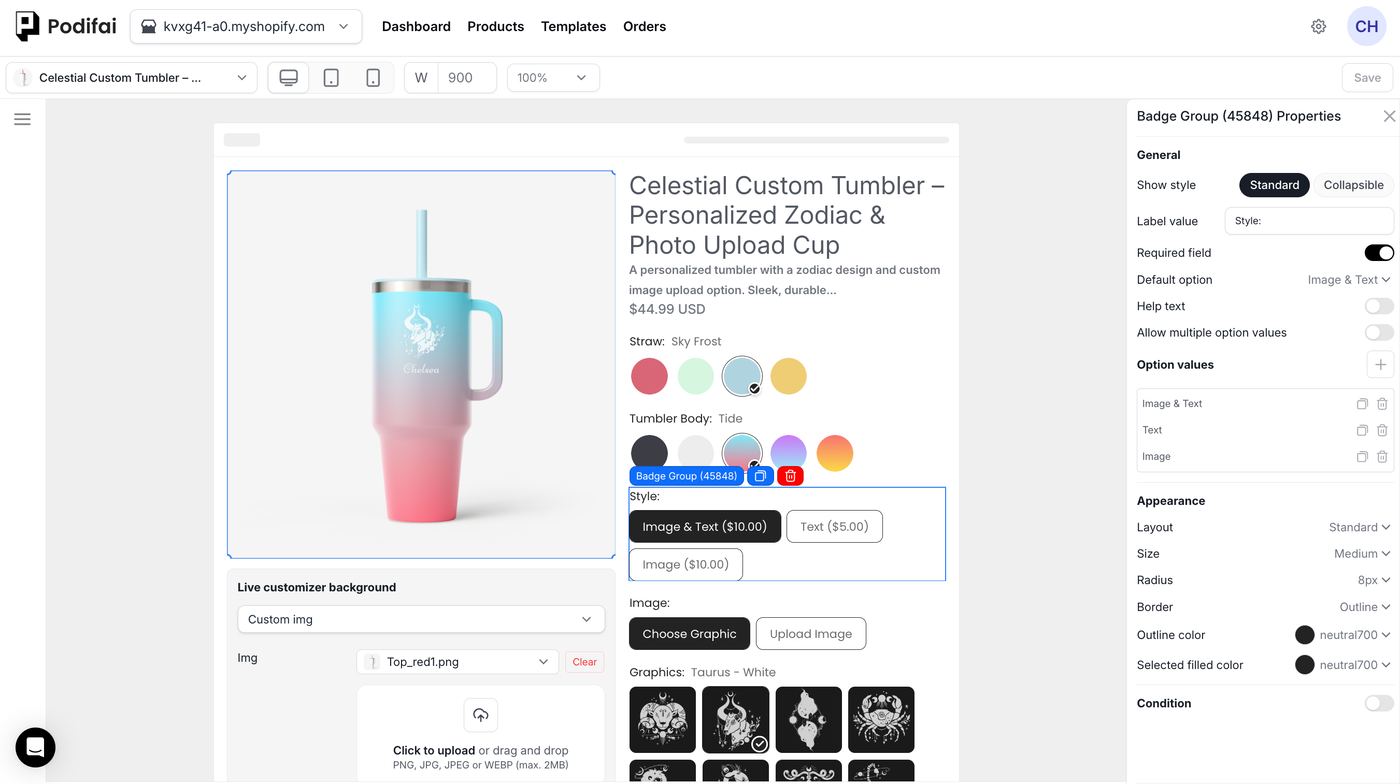
1. [Free] Podifai Product Customizer
Best for: Jewelry stores, gift shops, apparel brands, and any merchant selling visually customizable products
Podifai Product Customizer gives your customers a real-time preview of their customized product directly on your product page. They pick colors, add text or monograms, upload images, and see the result instantly — on both desktop and mobile. The Shopify App Store listing showed 4.9 out of 5 across 24 reviews when checked on 2026-09-18.
Key features:
- Real-time 2D product preview
- Text and monogram customization with font and color options
- Image upload for custom prints
- Font swatch selection
- Conditional show/hide rules
- Add-on pricing for premium options
- Inventory management by linking with the products from your Shopify admin
- Compatible with 99% of themes and expanding list of themes compatible for live preview section (both for app embeds & theme block)
- Mobile-responsive preview experience
Pricing:
| Plan | Price | What You Get |
|---|---|---|
| Free | $0/mo | Up to 3 custom products; core customization, live preview, personalization, pricing, inventory, templates, branding, conditional logic, and production features |
Free forever for up to 3 custom products. Starter is $7.9/month for up to 30 products, and Growth is $15.9/month for unlimited products. Existing customers keep their current full feature access. No plan charges per-transaction fees.
Pros:
- Free plan supports up to 3 custom products with no monthly or per-transaction fees
- Fast setup — most stores go live in under 10 minutes
- 2D and 3D preview — covers both flat products and multi-dimensional items
- Most capabilities are included on Free; email-template setup assistance, packing-slip setup assistance, and founder VIP support are paid-plan services
Cons:
- Shopify only — no WooCommerce, Etsy, or Amazon support
- No print-ready file output — you'll need separate fulfillment tools for POD
- Newer app — smaller review base compared to established competitors
Bottom line: Podifai is a strong option for merchants who need visual customization with live preview. The Free forever plan covers up to 3 custom products; paid plans support larger catalogs. The trade-offs: Shopify-only, no print-ready files, and a newer app with a smaller review base. Best suited for jewelry, gifts, apparel, and home decor stores.
Related: Launch a custom product line on Shopify in 2026
2. Teeinblue Product Personalizer
Best for: Growing and scaling businesses selling custom products on multiple e-commerce platforms like Shopify, Etsy and popular website builders such as WooCommerce, Magento, Wix, etc.
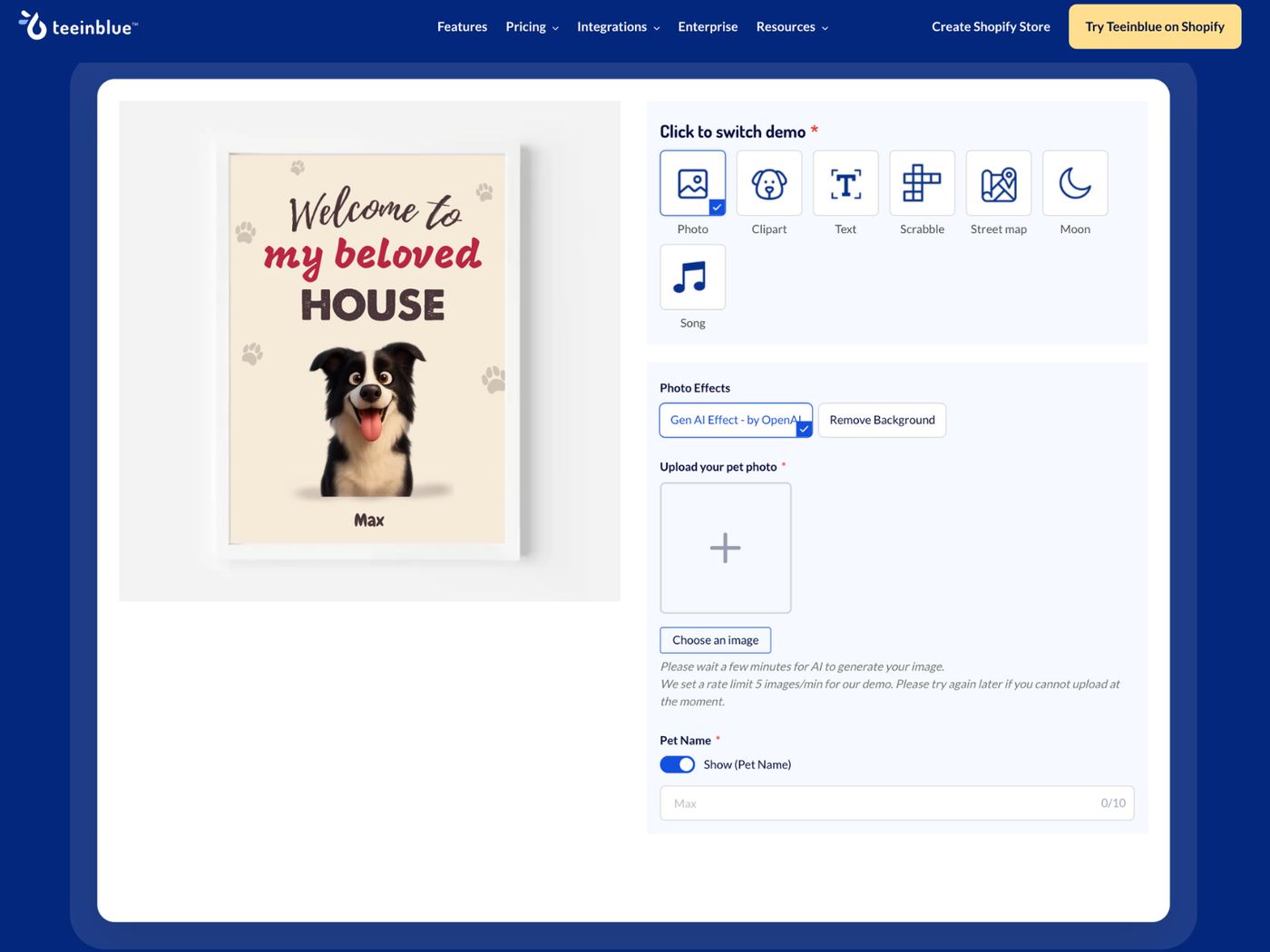
Teeinblue is the best product customizer to offer unlimited options with live preview. Whether you sell apparel, home decor, drinkware, or other categories, it can help. You can set up the first personalized product in 10 minutes through a simple 3-step workflow: add products, design & configure options, and publish. If you are scaling to Shopify, Etsy, WooCommerce, and other platforms, the app can handle high order volumes without interruption.
Key features
- Live preview personalization so customers see the final design instantly
- Unlimited customization fields, including text, images, icons, maps, moon phases, calendar, and songs
- AI-generated photo effects that transform uploaded photos into styles like watercolor, sketch, or cartoon illustrations
- Conditional logic rules that show or hide personalization options based on customer selections
- Free template library and design assets for faster product creation
- Automatic design file generation for production-ready order files
- Direct POD connection with popular providers like Printify, Printful, Gelato, merchOne, and more
Pricing: The pricing for Shopify and Etsy is $49/month each, with a 14-day free trial. For website builders (WooCommerce, Magento, Wix, and more), the pricing is $297/month (billed annually), $396/month (billed monthly).
Best for: Apparel, home decor, jewelry, drinkware, and accessories, especially gift-driven, emotionally meaningful products like pet portraits, star maps, custom name jewelry, and wedding keepsakes.
Teeinblue's edge is its end-to-end workflow, from building personalized designs to auto-generating print-ready files the moment an order comes in. The app is built to scale, processing 100,000+ orders per day without breaking a sweat. This makes it a reliable backbone for growing and enterprise POD businesses. Setup is straightforward enough for solo sellers to get a product live in under 10 minutes. Backing it all is a human live chat support team rated 4.9 stars on both Shopify and Trustpilot, where responsive and actionable help is consistently what merchants highlight most.
Limitations: Live chat support is human-staffed and well-reviewed, but not available 24/7.
→ For a detailed comparison: Teeinblue vs Podifai
3. [Free plan available] Globo Product Options
Best for: Stores that need basic product options (dropdowns, swatches, text fields) without visual preview
Check the linked Shopify App Store listing for the current rating, review count and review history.
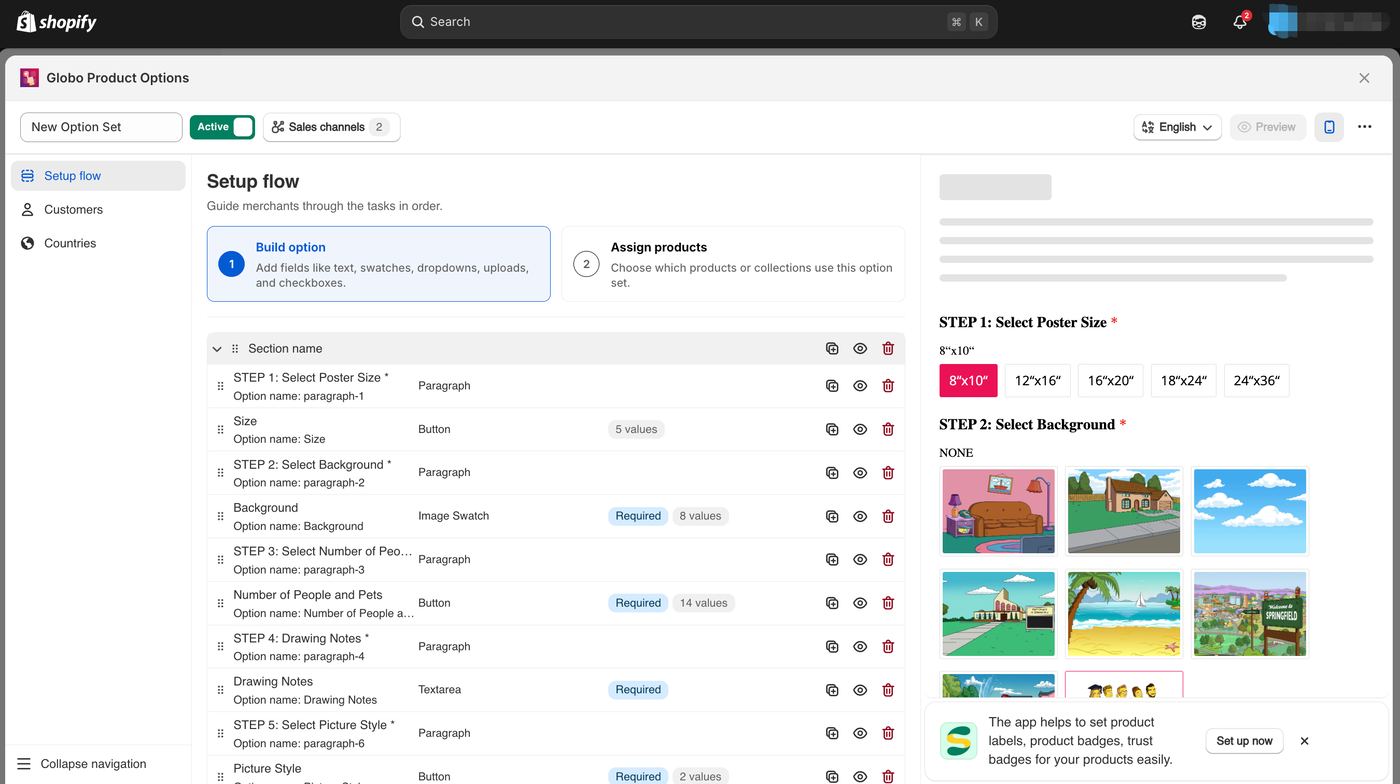
Globo adds custom product options — color swatches, text fields, dropdowns, file uploads, checkboxes, and more. It helps you break Shopify's 100-variant limit without slowing down your store.
Key features:
- 30+ option types on the Advanced plan; 20 on Premium; 15 on the free plan (swatches, dropdowns, text, file upload, checkbox, etc.)
- Conditional logic (show/hide options based on selections)
- Price add-ons and multi-language support
- Lightweight — minimal impact on page speed
Pricing:
| Plan | Price | Key Features |
|---|---|---|
| Free | $0/mo | Basic options + conditional logic |
| Premium | $9.90/mo | Price add-ons, file uploads |
| Advanced | $19.90/mo | 30+ option types, multi-language |
"Globo's support team was fantastic. They responded immediately, diagnosed the problem quickly, and restored normal functionality in a very short time." — Shopify App Store merchant review
Pros: Best free plan, massive social proof (4,300+ reviews), lightweight, excellent support.
Cons: Focusing more on custom options and the live preview feature is not intuitive.
What merchants love:
Globo's 4,300+ reviews (4.9 stars) make it the most social-proof-heavy app in this category. The recurring theme: it just works. Merchants praise the lightweight footprint, extensive option types, and responsive support. For stores that need product options without the overhead of visual customization, Globo is the safest bet.
What to watch out for:
Test add-on pricing with your product variants, conditional rules, cart and checkout. This guide does not have a reproducible review sample from which to estimate the frequency of pricing problems.
The bigger limitation is structural: Globo is primarily a form builder. Live preview only ships on the $19.90/mo Advanced tier — the $9.90/mo Premium tier and free plan have none. If your customers need to see their personalization before buying (text on jewelry, logos on apparel), Globo isn't the right tool.
→ For a detailed comparison: Globo vs Podifai
4. Easify Custom Product Options
Best for: Product options with live preview at a budget-friendly price
Check the linked Shopify App Store listing for the current rating, review count and review history.
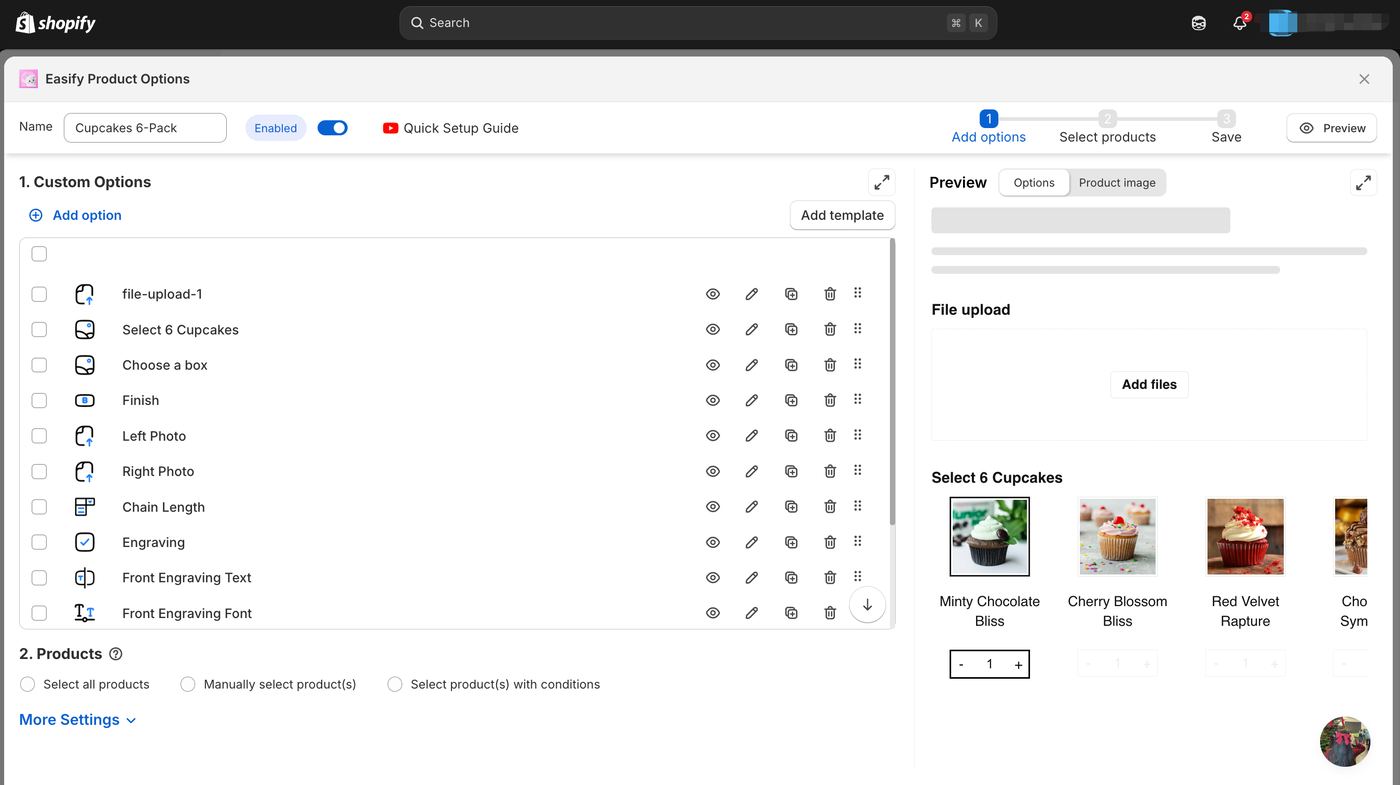
Easify combines product options with a live preview system. It offers 28 option types on Pro and above; 15 on the free plan at a price point that undercuts most competitors.
Pricing: Free plan available. Pro plan $9.99/mo (options-only). Premium $19.99/mo adds the Product Personalizer — Live Preview. Enterprise $99.99/mo. 14-day free trial.
"The only Shopify app that I've used that has live chat for support — a true game changer when you need assistance." — Shopify App Store merchant review
Pros: Budget-friendly options at $9.99/mo (Pro), live preview at $19.99/mo (Premium) — still cheaper than most competitors, 28 option types.
Cons: Focusing more on custom options and the live preview feature is not intuitive.
What merchants love:
For Easify, test the preview workflow on the plan you intend to buy and confirm the available support channels. This guide does not have a reproducible dataset for a year-over-year review-growth claim.
What to watch out for:
Easify's live customizer/configurator is not intuitive compared to dedicated 2D/3D customizers — it shows option selections visually but really hard to configure and preview in the same time.
5. Customily Product Personalizer
Best for: Print-on-demand merchants who sell on multiple platforms (Shopify, Etsy, WooCommerce, Amazon)
Check the linked Shopify App Store listing for the current rating, review count and review history.
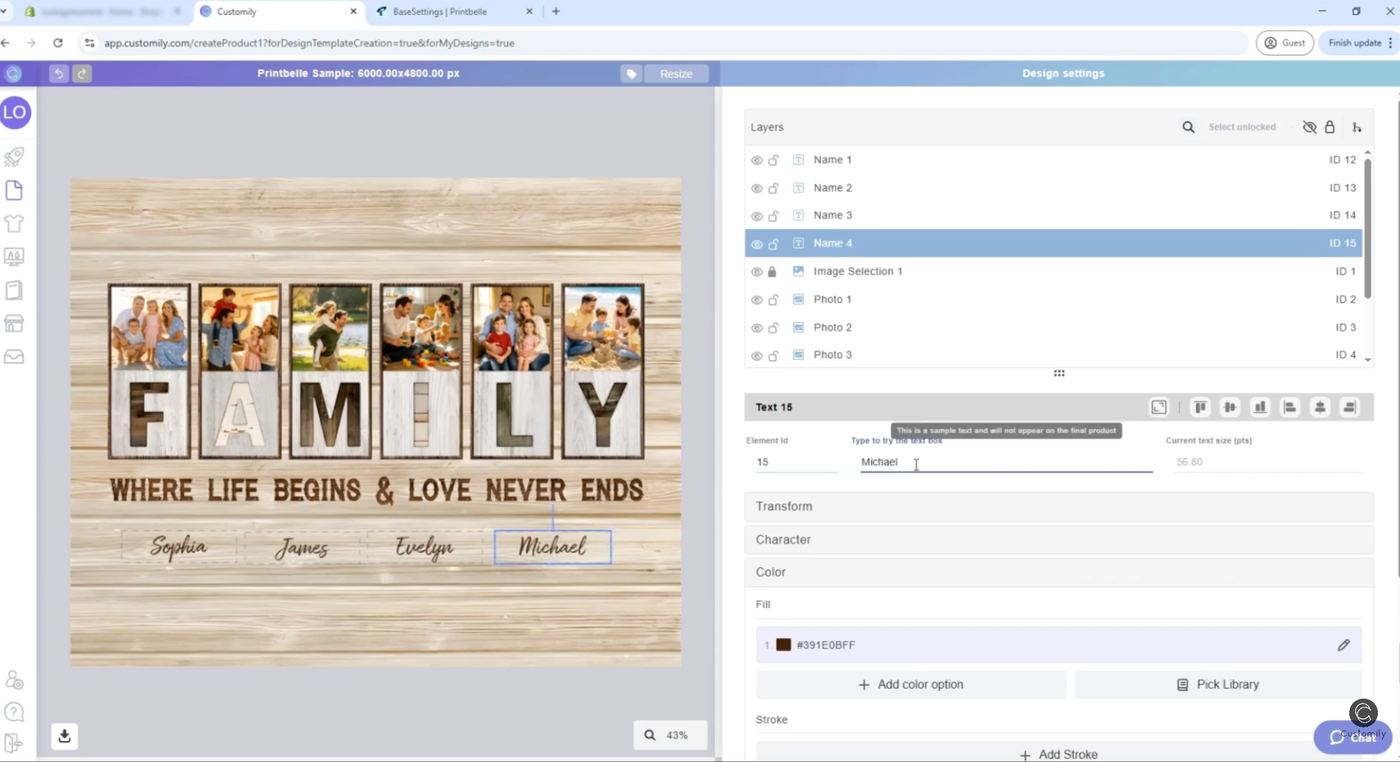
Customily's real differentiator: multi-platform support — manage customization for Shopify, Etsy, WooCommerce, Amazon, Walmart, BigCommerce, Magento, and Shoplazza — 8 platforms total — from one dashboard.
Pricing: $49/month per platform with a 9-day free trial. Tiered per-item transaction fees: $1.00 (1-100 items) → $0.50 (101-1,000) → $0.25 (1,001-10,000) → $0.10 (10,001+).
"The app is very powerful but not very intuitive — the interface feels clunky, with many tools feeling disconnected from one another." — Shopify App Store merchant review
Pros: True multi-platform support (only app covering Shopify + Etsy + WooCommerce + Amazon + Walmart + BigCommerce + Magento + Shoplazza (8 platforms)), print-ready files.
Cons: $49/mo with no free tier, not intuitive, 2D only, short 9-day trial.
What merchants love:
Customily is the only app in this list with genuine multi-platform support — Shopify, Etsy, WooCommerce, Amazon, Walmart, BigCommerce, Magento, and Shoplazza — 8 platforms total — from one dashboard. For merchants selling personalized products across multiple marketplaces, this alone justifies the $49/month. The print-ready file generation is production-grade.
What to watch out for:
For Customily, test the template-building and production-file workflow with your actual artwork. Check its current plan and usage fees in the official listing. We do not have a reproducible review sample from which to estimate the prevalence of setup difficulties.
→ For a detailed comparison: Customily vs Podifai
6. Kickflip Product Configurator
Best for: Multi-component products where customers mix and match parts
Check the linked Shopify App Store listing for the current rating, review count and review history.
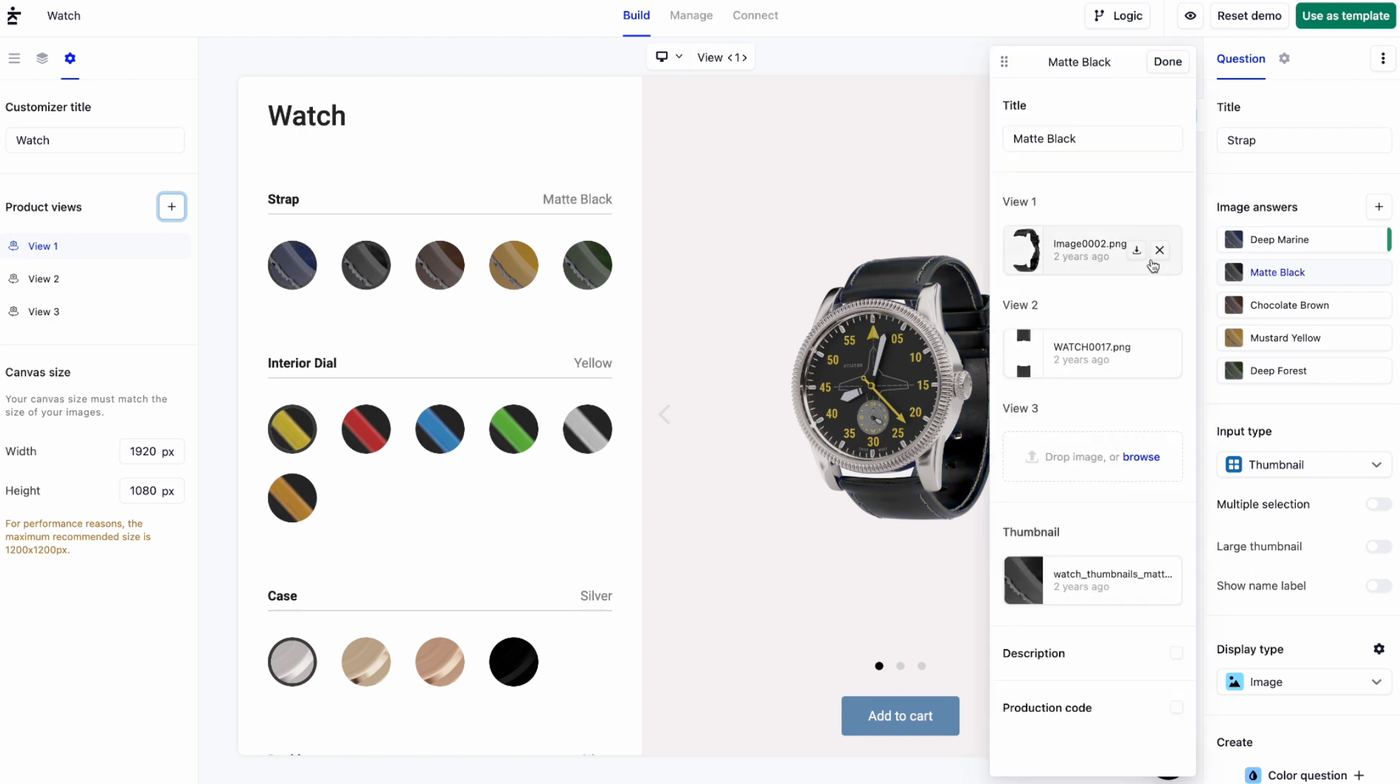
Kickflip lets customers configure products by choosing components and viewing supported changes. Do not equate a layered visual configurator with native 3D rotation or AR; confirm those requirements separately.
Pricing: $59/month + 1.95%-to-0% transaction fee (scales down by volume). 14-day free trial.
Note: Kickflip recently replaced its multi-tier pricing (starting at $7.99/mo) with a single $59/mo plan plus transaction fees. Some merchants have noted this made the app less affordable for small businesses.
"The 'pay as you grow' plan was canceled and replaced with a much higher monthly subscription plus a per-transaction fee, which is no longer affordable for small businesses." — Shopify App Store merchant review
Pros: A component-based product configuration workflow. Test the preview and mobile interaction with your own product.
Cons: Expensive ($59/mo + 1.95% fee), recent pricing increase, complex setup.
What merchants love:
Kickflip's component-based configurator is genuinely unique — customers can add, remove, and swap parts of a product in a visual builder. For furniture, custom bikes, modular accessories, and similar multi-component products, no other app in this list comes close. The mobile experience is smooth, and the 3D-style visualization (rendered from 2D assets) gives customers confidence in what they're building.
What to watch out for:
For Kickflip, compare the base subscription, any commission and optional add-ons. Its published commission decreases with volume, so a calculation using the starting rate is an upper-bound example, not a quote. Check the current vendor terms for your expected custom-product sales.
→ For a detailed comparison: Kickflip vs Podifai
7. Zakeke Customizer 2D 3D
Best for: 3D visualization plus AR (augmented reality) product viewing
Check the linked Shopify App Store listing for the current rating, review count and review history.
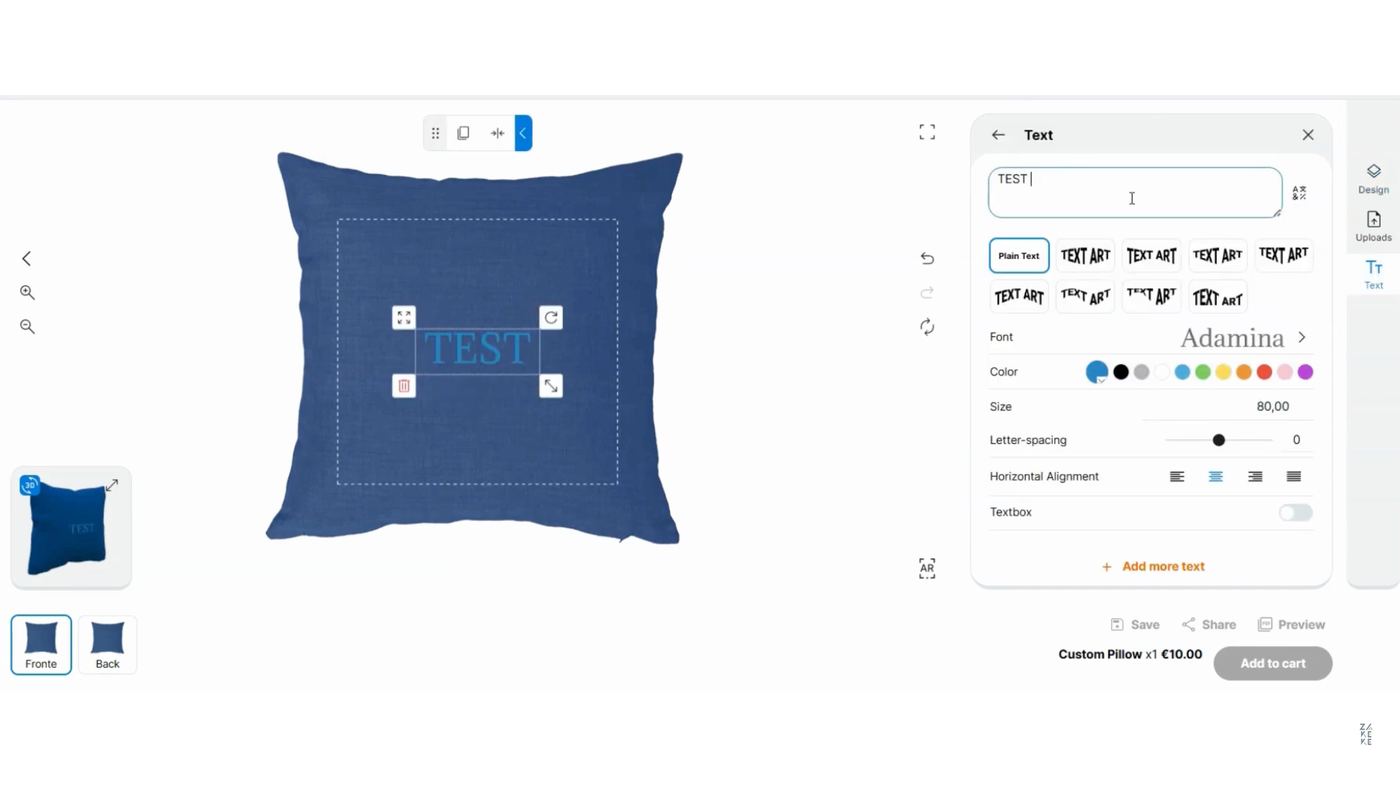
Zakeke offers 2D and 3D product customization with an AR viewer that lets customers see products in their space.
Pricing:
| Plan | Price | Includes |
|---|---|---|
| Starter | $69.90/mo | 50 products, 1,000 views |
| Grow | $129.90/mo | 100 products, 2,500 views |
| Scale | $299.90/mo | Higher limits |
| + Transaction fee | 1.5–1.9% (by plan) | Per customized product sold |
Pros: AR viewer (useful for furniture/decor), strong 3D visualization, print-ready files.
Cons: Double-dip pricing (monthly + transaction fees), view limits, expensive at scale.
What merchants love:
Zakeke is the only app in this comparison with true WebGL 3D rendering and AR (augmented reality). Customers can view products in their real space using their phone camera — particularly useful for home decor, furniture, and accessories. The print-ready file output supports multiple formats, and the 3D visualization quality is the best in this category.
What to watch out for:
Zakeke uses a double-dip pricing model: monthly subscription ($69.90 Starter / $129.90 Grow / $299.90 Scale) plus tiered transaction fees on all plans (1.9% / 1.7% / 1.5% respectively, minimum 2¢). On top of that, lower-tier plans cap the number of published products (10 on Starter, 50 on Grow, 100 on Scale). At scale, costs add up quickly. For example, at 200 orders/month with $75 AOV, the Starter plan ($69.90/mo) becomes $69.90 + 1.9% × $15,000 = $69.90 + $285 = $354.90/month — and that's before hitting the 10-product cap. Multiple merchants have reported unexpected bills when traffic spikes.
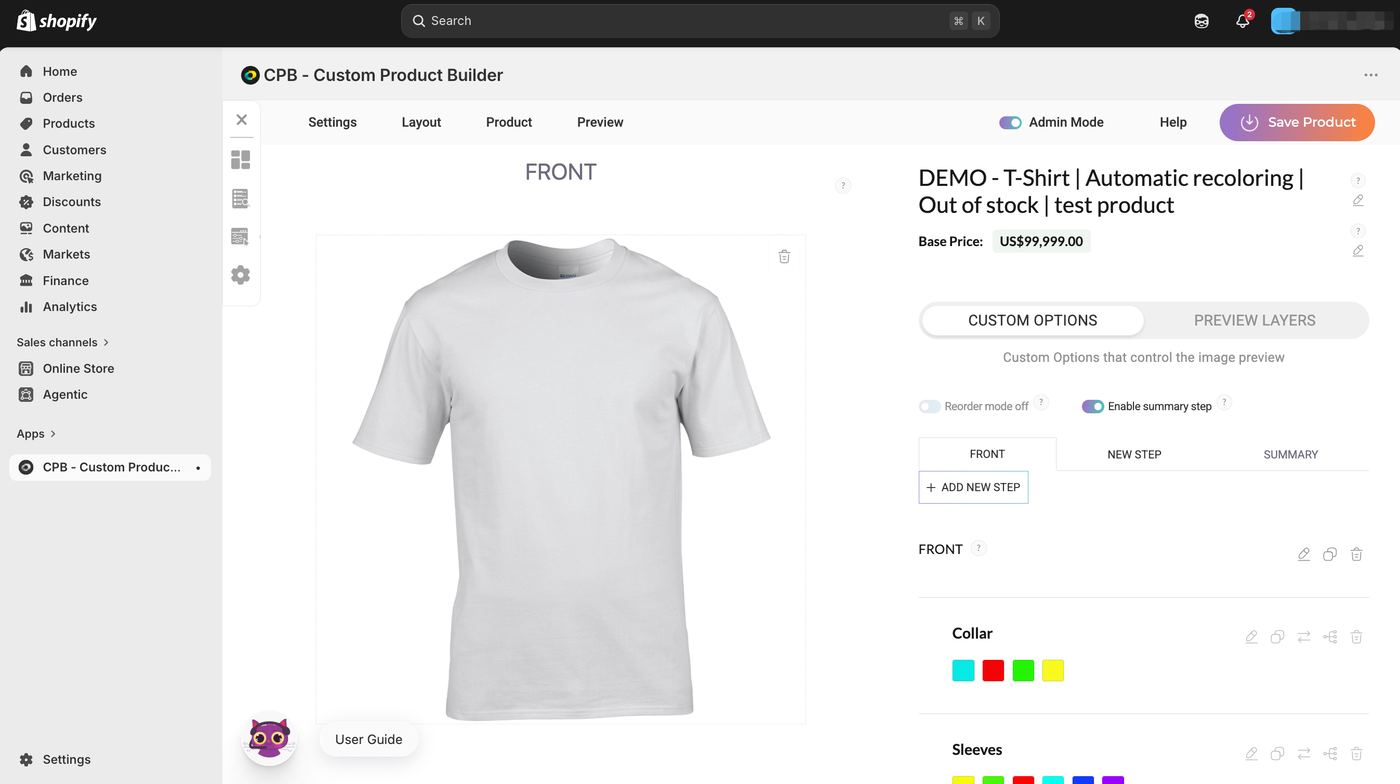
8. CPB — Custom Product Builder (by Buildateam)
Best for: Stores needing deep product configuration with SKU-level inventory management — furniture, custom packaging, modular products.
Historical pricing snapshot: Per-fulfilled-order fees (no monthly subscription) Check the current official listing before choosing a plan.
CPB takes a fundamentally different approach: instead of monthly subscriptions, you pay per fulfilled order — 2% for your first 50 orders, scaling down to 0.8% at 10,000+ orders, capped at $3,000 per fulfilled order. For stores with variable or seasonal order volumes, this usage-based model can be significantly cheaper than fixed monthly fees.
The standout feature is deep SKU-level inventory management. CPB can create and track variants dynamically based on customer selections, automatically managing stock levels across combinations. This is the kind of configuration tool you need for products with 50+ possible combinations where inventory accuracy matters.
Pricing tiers (per fulfilled order):
- 0–50 orders: 2.0%
- 51–400 orders: 1.8%
- 401–1,000 orders: 1.5%
- 1,001–5,000 orders: 1.1%
- 5,001–10,000 orders: 1.0%
- 10,001+ orders: 0.8% (max $3,000 per fulfilled order)
What merchants love:
The SKU constructor and inventory tracking are enterprise-grade features at a mid-market price. Merchants praise the no-monthly-fee model — you only pay when you make sales. The conditional logic and multi-step product builders handle complex configuration flows that simpler apps can't.
What to watch out for:
The per-order fee model means costs scale with revenue. At 300 orders/month with $95 AOV, you're paying ~$513/month (1.8% tier) — significantly more than flat-rate apps. The interface is utilitarian and setup requires more technical configuration than consumer-friendly apps like Globo or Easify. Shopify-only with no multi-platform support.
9. Zepto Product Personalizer
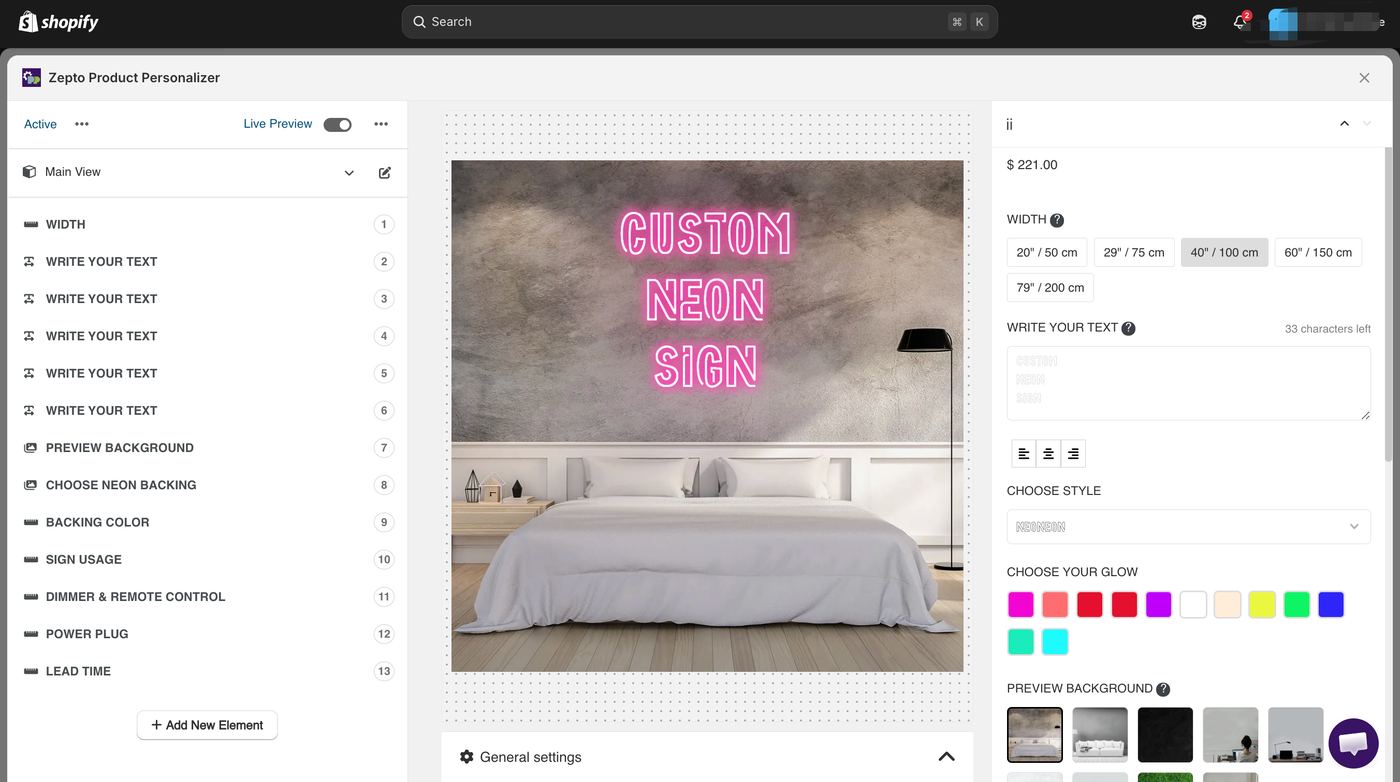
Best for: Stores needing a mature, full-featured product personalizer with multi-component "Build Your Own Product" capabilities and SKU-level inventory management.
Historical pricing snapshot: $9.99–$49.99/month (15-day free trial) Check the current official listing before choosing a plan.
Zepto offers product options and personalization workflows. Confirm live preview, pricing, inventory linkage and any builder requirements against the current plan and your own Shopify product. Check the official listing for current ratings and reviews.
Pricing tiers:
- Starter: $9.99/month — 100 custom orders/month, up to 50 products
- Basic: $19.99/month — 300 custom orders/month, up to 200 products
- Pro: $29.99/month — 500 custom orders/month, up to 500 products
- Unlimited: $49.99/month — unlimited custom orders, unlimited products
What merchants love:
Shopify's auto-generated review summary captures it well: "Merchants highly recommend this app for its advanced product customization features, including bulk editing and live previews, which cater well to large catalogs. The user-friendly interface facilitates easy setup and navigation. Exceptional customer support is frequently highlighted, with services like live chat and custom coding."
Zepto covers an unusually wide range of use cases in a single app — from simple text personalization to complex multi-component product builders. The SKU management and out-of-stock hiding are features typically only found in more expensive apps like CPB or Kickflip.
What to watch out for:
Read recent Zepto reviews alongside its documentation, and test option pricing, cart behavior and inventory linkage. Selected negative reviews cannot establish how often an issue occurs across all merchants.
Bug-related revenue loss: The most serious complaints involve software bugs causing lost sales:
- "we lost over 70% of our revenue. Because of a bug in their software which they took over 6 hours to figure out." — Name Strings, India
- "Every single personalisation option just vanished from the site, 1000s of products that had options now have no option for any personalisation." — Print My Tops
- "I've been dealing with issues for over two months now. Their image upload feature works inconsistently, causing lost sales." — Chic Signs
UI redesign friction: Zepto underwent a major interface overhaul that disrupted some workflows: "The new interface makes no sense. It's completely impossible to navigate." — KOLEKTO, Denmark
Order caps: Unlike flat-rate apps, Zepto limits orders by plan tier — 100 on Starter, 300 on Standard, 500 on Pro. At 500 orders/month, you're at $49.99/month ($600/year) with no room to grow without enterprise pricing.
For Zepto, compare the required options, preview, inventory and pricing workflow with the current plan. Use the live App Store listing for ratings and a representative product trial for your decision.
→ For a detailed comparison: Zepto vs Podifai
Side-by-side comparison
Feature comparison
| App | Starting Price | Live Preview | 3D | Print Files |
|---|---|---|---|---|
| Podifai | Free | Yes (2D) | No | No |
| Globo | Free / $9.90 | No | No | No |
| Easify | Free / $9.99 | Yes (basic) | No | No |
| Customily | $49/mo | Yes (2D) | No | Yes |
| Kickflip | $59/mo + 1.95% | Yes | No — image-based 2D | Advertised; verify required output |
| Zakeke | $69.90/mo + 1.9% | Yes (2D+3D) | Yes+AR | Yes |
| Teeinblue | $49/mo | Yes | No | Yes |
Pricing comparison (watch for hidden costs)
Total monthly cost at 100 custom sales/month with $50 average order value:
| App | Monthly Fee | Transaction Fee | Total at 100 Sales |
|---|---|---|---|
| Podifai | $0 | None | $0/mo |
| Globo Premium | $9.90 | None | $9.90/mo |
| Easify Pro | $9.99 | None | $9.99/mo |
| Teeinblue BLUE | $49 | First 100 orders no fee; then $0.40/item | $49/mo |
| Customily | $49 | Per-order fee | ~$49+/mo |
| Kickflip Scale | $59 | 1.95% | $156.50/mo |
| Zakeke Starter | $69.90 | 1.9% | $164.90/mo |
At 100 custom sales/month with $50 AOV, Kickflip and Zakeke cost 3–8x more than flat-rate alternatives due to transaction fees.
What it actually costs: annual pricing by store type
Monthly comparisons are misleading — transaction fees, per-order charges, and tier upgrades change the math completely over 12 months. Here are five real scenarios:
Scenario 1: Small personalization store (50 orders/month, $45 AOV — jewelry, gifts)
| App | Monthly | Annual |
|---|---|---|
| Podifai | $0–$15.9 (by custom-product count) | $0–$190.80 |
| Globo | $9.90 | $119 |
| Easify | $9.99 | $120 |
| Zepto | $9.99 | $120 |
| Customily | $49 | $588 |
| Kickflip | $59 + $44 | $1,236 |
| Zakeke | $69.90 + $43 | $1,352 |
Scenario 2: Growing store (200 orders/month, $65 AOV — apparel, home decor)
| App | Monthly | Annual |
|---|---|---|
| Podifai | $0–$15.9 (by custom-product count) | $0–$190.80 |
| Globo | $19.90 | $239 |
| Easify | $9.99 | $120 |
| Zepto | $19.99 | $240 |
| Customily | $49 | $588 |
| Kickflip | $59 + $254 | $3,756 |
| Zakeke | $69.90 + $247 | $3,803 |
Scenario 3: Product configuration store (100 orders/month, $95 AOV — furniture, custom packaging)
| App | Monthly | Annual |
|---|---|---|
| Podifai | $0–$15.9 (by custom-product count) | $0–$190.80 |
| Kickflip | $59 + $185 | $2,933 |
| CPB | $95 (2%) | $1,140 |
| Zepto | $19.99 | $240 |
Scenario 4: Print-on-demand business (300 orders/month, $37 AOV)
| App | Monthly | Annual |
|---|---|---|
| Teeinblue | $129 | $1,548 |
| Customily | $49 | $588 |
| CPB | $185 (1.8%) | $2,220 |
Scenario 5: Basic options store (150 orders/month, $55 AOV — general retail)
| App | Monthly | Annual |
|---|---|---|
| Podifai | $0–$15.9 (by custom-product count) | $0–$190.80 |
| Globo | $19.90 | $239 |
| Easify | $9.99 | $120 |
| Zepto | $9.99 | $120 |
Hidden costs to watch for
| App | Tx Fee | Per-Item Fee | Feature Paywall | White-Label Cost | View/Order Limits |
|---|---|---|---|---|---|
| Podifai | None | None | None | Free | None |
| Globo | None | None | Conditional logic: $24.90+ | N/A | None |
| Easify | None | None | Live preview: $19.99+ | N/A | None |
| Customily | None | Yes (certain plans) | Base $49/mo + per-item: $1.00 (1-100) → $0.50 (101-1k) → $0.25 (1k-10k) → $0.10 (10k+) | Included | None |
| Kickflip | 1.95% | None | All features at $59 | Included | None |
| Zakeke | 1.5–1.9% by plan | None | AR: $99.90+ | $299.90/mo (Scale) | 1,000–30,000 views |
| Teeinblue | Usage fee after 100 orders | $0.10-$0.40/item by tier | All features included | Not listed | First 100 orders no fee |
| CPB | 0.8–2.0% | None | All features included | N/A | None (capped $3K/order) |
| Zepto | None | None | Multi-component: $24.99+ | N/A | 100–500 orders |
What merchants actually say: a review data analysis
We analyzed negative reviews across all 9 apps to identify the most common complaint patterns. Here's what the data shows:
Done comparing pricing? Podifai's Free forever plan costs $0/month for up to 3 custom products, regardless of order volume. Starter is $7.9/month for up to 30 products and Growth is $15.9/month for unlimited products, with no transaction fees. See how live preview works → · Compare conditional logic →
Product customization ROI: what the data says
Is product customization worth the investment? For most stores selling personalizable products, yes. But the ROI depends heavily on your product type and how well customers can actually use the customizer.
Personalization research covers several different practices, including marketing and recommendations. It does not establish a specific customer-acquisition or revenue improvement from installing one of these apps.
Evidence supporting this:
- Track outcomes for your own store: completed orders, order value and customization-related support or production errors.
- Track outcomes for your own store: completed orders, order value and customization-related support or production errors.
- Track outcomes for your own store: completed orders, order value and customization-related support or production errors.
- Fewer returns — live preview reduces expectation mismatches significantly
"More and more marketing is rooted in people's identities. 2026 is the year of the normal person — brands engaging with real people in a genuine way outperform those relying on generic experiences." — Grace Clarke, marketing strategist & Shopify's former head of community marketing
Related: Shopify product customization mistakes to avoid in 2026
Broader research on recommendations and dynamic content does not establish an order-value increase from physical product customization. Use a documented store-level comparison to assess the effect of your own implementation.
One metric that often gets overlooked: time on page. Shopify stores with product customizers consistently see significantly longer session durations on product pages. That extended engagement isn't just a vanity metric — it directly correlates with higher conversion rates.
How to set up a product customizer on Shopify
Setting up a product customizer on Shopify takes about 15 minutes with most apps — faster if you've done it before. You install from the Shopify App Store, pick the products you want to customize, configure your options (text fields, image uploads, color pickers), and publish. The trickiest part is usually getting the preview to match your product photos, which might need some back-and-forth.
- Step 1: Install a customizer app. Go to the Shopify App Store, search for a product customizer (like Podifai, Globo, or Easify), and click Install.
- Step 2: Enable the app embed. In Shopify admin → Online Store → Themes → Customize → App Embeds, toggle on the customizer app.
- Step 3: Create your first customizer. Open the app dashboard, select a product, add option fields — text input, color swatches, image upload, or dropdown menus.
- Step 4: Configure pricing and logic. Set add-on prices for premium options. Add conditional logic to show/hide options based on selections.
- Step 5: Preview, test, and publish. Test on desktop and mobile. Place a test order. Once satisfied, publish.
Most merchants go live in under 15 minutes.
Related: How to create personalized bundles that sell
Real merchant experiences
What works well
Support makes or breaks the experience. After testing all 10 apps, this was the clearest pattern: customer support is the most frequently mentioned factor in reviews. Apps like Globo (instant response), Easify (live chat), and Zepto (live chat + custom coding) consistently earn praise. Podifai offers 1:1 onboarding — which matters more than people think when you're configuring product options for the first time.
Visual preview reduces support tickets. Merchants using live preview apps report fewer "what will my product look like?" inquiries.
Setup is faster than expected. Apps with 1:1 onboarding (Podifai) or extensive documentation (Zepto, Easify) get the highest satisfaction scores.
Watch out for
Pricing model surprises. This is the one that gets people. Multiple Kickflip and Zakeke reviewers mention being caught off guard by transaction fees that weren't obvious upfront. Always calculate total cost at your expected volume — the comparison table above does this for you.
Interface complexity. Customily merchants note the app is powerful but not intuitive. If ease-of-use matters, prioritize simpler interfaces like Globo and Easify.
Platform lock-in. Most apps are Shopify-only. Only Customily has genuine multi-platform support.
How to choose the right app for your store
"I sell jewelry, gifts, or personalized accessories"
The right product customization app depends on your product type, budget, and what your customers actually need to see before buying. A jewelry store that needs live engraving preview has very different requirements than a print-on-demand business processing bulk orders. Here's how to match your situation to the best option.
→ Compare: Customily vs Podifai · Kickflip vs Podifai · Globo vs Podifai
→ Market data: See our Custom Jewelry Market Report and Custom Gifts Market Report for store rankings and customization tool adoption.
"I run a print-on-demand business"
Customily (multi-platform) or Teeinblue (Printify/Printful on a budget). CPB for POD stores needing inventory management.
→ Compare: Teeinblue vs Podifai · Customily vs Podifai
"I just need basic product options"
Globo's free plan. Add Easify ($9.99/mo) if you want basic live preview.
"I sell on multiple platforms"
Customily — the only app with Shopify + Etsy + WooCommerce + Amazon + Walmart + BigCommerce + Magento + Shoplazza (8 platforms) support.
"I'm on a tight budget"
Globo (free), Easify (free), Podifai (free for up to 3 custom products). Paid: Podifai Starter $7.9/month and Growth $15.9/month; Globo $9.90/mo, Easify $9.99/mo.
Related: Building trust with transparent customization rules
🔍 Browse 211 real Shopify stores with product customization for implementation inspiration. Or explore 66 market reports covering 17,794 stores across every custom product category.
Frequently asked questions
Where can I see examples of Shopify stores with product customization?
Our Shopify Customization Directory showcases 211 real stores organized by category. For market-level data, our Custom Product Market Reports cover 66 product categories across 17,794 stores, with revenue estimates and which customization tools each store uses.
What is the difference between personalization and configuration?
Personalization = customer-created content (adding names, uploading photos, choosing fonts). Configuration = selecting from predefined options (wood type, fabric, components). Most apps handle personalization well; configuration with inventory tracking is where the field narrows. Apps like CPB, Kickflip, and Zepto specialize in configuration.
What is the best free Shopify product customization app?
The best free Shopify product customization app is the one that covers the merchant's required option types, visual preview needs, pricing rules, and order data at no cost for the current store stage. Globo is strongest for basic non-visual options; Podifai is the better fit when the free workflow also needs live preview and Shopify product-page embedding.
Can I add product customization to Shopify without coding?
Yes. All 9 apps install through the Shopify App Store and use app embeds — no coding required. Most take under 15 minutes to set up. Apps like Podifai offer 1:1 founder onboarding.
Do product customization apps slow down my store?
Lightweight apps like Globo and Easify have minimal impact. Apps with 3D visualization load additional assets, but well-optimized ones use lazy loading. Always test page speed before and after installing.
What's the difference between product options and product customization?
Product options = predefined choices (size, color) via dropdowns/swatches. Product customization = customer-created content (names, images, designs) with real-time preview. There's overlap, sure. But if your customers are adding their own text or uploading images, you need a customization app, not just an options app.
How much does a Shopify product customizer cost?
Free options exist (Podifai, Globo free tier, Easify free tier). Paid plans range from $9.90/month (Globo) to $59+/month (Kickflip). Watch for transaction fees — at 100 sales/month with $50 AOV, Kickflip's 1.95% fee adds $97.50/month on top of the $59 subscription. See the annual cost breakdown above for full calculations.
Which app is best for jewelry stores?
Podifai — real-time 2D preview, monogram support, add-on pricing for engraving. Kickflip for interchageable components. Zakeke for AR try-on.
Can I use multiple customization apps on the same store?
Technically yes, but not recommended. Multiple apps can conflict and slow your pages. Pick one that covers your needs — most allow different customizer templates for different products.
Do these apps work with Shopify's native checkout?
Yes. All 9 apps integrate with Shopify's standard checkout. Customization details appear in order confirmations, packing slips, and Shopify admin.
Does product customization increase sales?
Yes. McKinsey reports personalization lifts revenue 5–15%. Visual customization also reduces returns, with Harvard Business Review documenting up to 40% fewer returns on customized products. (Source: Harvard Business Review, 2022)
What is the best app for print-on-demand?
The best app for print-on-demand product customization is the app that turns shopper selections into reliable production data, print-ready files, mockups, and clear order notes. Customily is often a fit for established POD operations; Podifai is better for Shopify merchants who need simpler live preview, uploads, and add-on pricing without POD production automation.
How do I know if I need a product customizer?
If customers frequently ask for personalized options, you manually process customization requests via order notes, or competitors offer customization that you don't — you need one.
Are these apps compatible with all Shopify themes?
Most use Shopify's app embed/app block system, which works with any Online Store 2.0 theme. For older vintage themes, check with the app's support team.
Bottom line
There's no single "best" app for every store — and anyone who tells you otherwise is probably selling one. The right choice depends on what you sell, how customers interact with your products, and what you're willing to spend.
For visual customization with live preview — particularly jewelry, gifts, apparel, and home decor — Podifai, Zakeke, and Customily each have strengths. Podifai offers plans from $0/month with no transaction fees, but is Shopify-only with no print files. Zakeke has the best 3D/AR but charges monthly plus 1.7% per transaction. Customily supports multiple platforms but costs $49/month.
For print-on-demand, Customily (multi-platform) and Teeinblue (Printify/Printful integration) handle both customization and production files.
For basic product options on a budget, Globo's free plan or Easify's free plan are hard to beat.
Most apps offer free trials. Install one, set it up on a test product, and see how it feels — that's worth more than any comparison guide.
Ready to add live customization previews to your Shopify products? Try Podifai free — no credit card required →
Related: Detect what customization app any Shopify store uses — our free tool identifies the product customizer running on any Shopify product page.
📚 Related Articles
- 15 Best Product Configurator Examples with Live Preview 2026
- Why Real-Time Product Preview Boosts Customer Confidence
- Why A/B Testing Custom Options Is Key to Conversions
- 7 Ways Personalization Can Increase Your Shopify Store's Average Order Value
📚 Related Articles
- 15 Best Product Configurator Examples with Live Preview 2026
- Why Real-Time Product Preview Boosts Customer Confidence
- Why A/B Testing Custom Options Is Key to Conversions
- 7 Ways Personalization Can Increase Your Shopify Store's Average Order Value
What is the most important feature in a product customization app?
Live preview is the most critical feature. Customers need to see their customizations in real-time to build purchase confidence. Mobile responsiveness is equally important since over 70% of Shopify traffic comes from mobile devices. Apps without live preview have significantly lower conversion rates. (Source: Artzen, 2025)
How long does it take to set up product customization on Shopify?
Most merchants complete setup in 10-15 minutes. The process involves installing the app, enabling app embeds in your theme, creating customization options, and testing. Apps like Podifai offer 1:1 onboarding to help you configure everything correctly on your first try.
Which customization apps work best for mobile customers?
See how top Shopify merchants use these customization apps in practice — check our store rankings for Custom Signs, Custom Plaques, Custom Wallets, and Custom Stickers.
Podifai, Easify, and Globo are optimized for mobile with touch-friendly interfaces and responsive previews. Avoid apps with complex 3D interfaces on mobile. Test the customization experience on your phone before choosing — clunky mobile experiences kill conversions.
What's the cheapest Shopify product customizer with live preview?
Podifai has a Free forever plan for up to 3 custom products with live preview, conditional logic, and add-on pricing. Starter supports up to 30 products for $7.9/month, and Growth supports unlimited products for $15.9/month, with no transaction fees. Easify ($9.99/mo) and Globo (free plan, paid from $9.90/mo) are the next cheapest options but Globo's Premium ($9.90/mo) and free plan have no live preview; live preview requires the Advanced tier ($19.90/mo). For paid live-preview apps at scale, Zakeke and Kickflip start around $25–$59/mo before transaction fees — see the full pricing breakdown above or try Podifai's live preview free.
Which Shopify customization app has no transaction fees?
Podifai, Globo, Easify, and Zepto charge a flat monthly fee (or are free) with no per-transaction fees. Teeinblue uses a $49/month BLUE plan and usage-based item fees after the first 100 orders ($0.40/$0.20/$0.10 by volume tier). Kickflip charges 1.95% per transaction on top of $59/mo, Zakeke charges 1.7% on top of $24.90–$209.90/mo, and CPB uses a per-fulfilled-order fee model (0.8%–2% depending on volume). For high-volume stores, flat-rate apps almost always work out cheaper — a 200-order/month store paying Kickflip's 1.95% fee at $65 AOV adds ~$25/month on top of the base subscription.
Which app is best for custom mug stores with live preview?
For custom mugs with live photo/text preview, Podifai's Free forever plan handles the visual preview layer with text + image upload + font selection for up to 3 custom products. If you're print-on-demand, Teeinblue or Customily add print-ready file generation for Printful/Printify/Gelato (Teeinblue BLUE is $49/mo with the first 100 orders at no transaction fee, then pay-as-you-go item fees; Customily flat $49/mo with multi-platform support). Mug stores typically need: image upload, text with font swatch, real-time wrap preview, and a print-ready PNG output — if you don't need print files, Podifai's Free forever plan covers the customer-facing experience for up to 3 custom products. Install Podifai free →
Stop comparing — start customizing. Install Podifai's Free forever plan and get live preview + conditional logic + add-on pricing for up to 3 custom products. No credit card, transaction fees, or order caps. Get started free →