Product Configuration Software for Shopify
Configure made-to-order products on an existing Shopify product page with custom options, layered 2D preview, conditional rules, price add-ons, inventory links, and readable order data.
 Free install on Shopify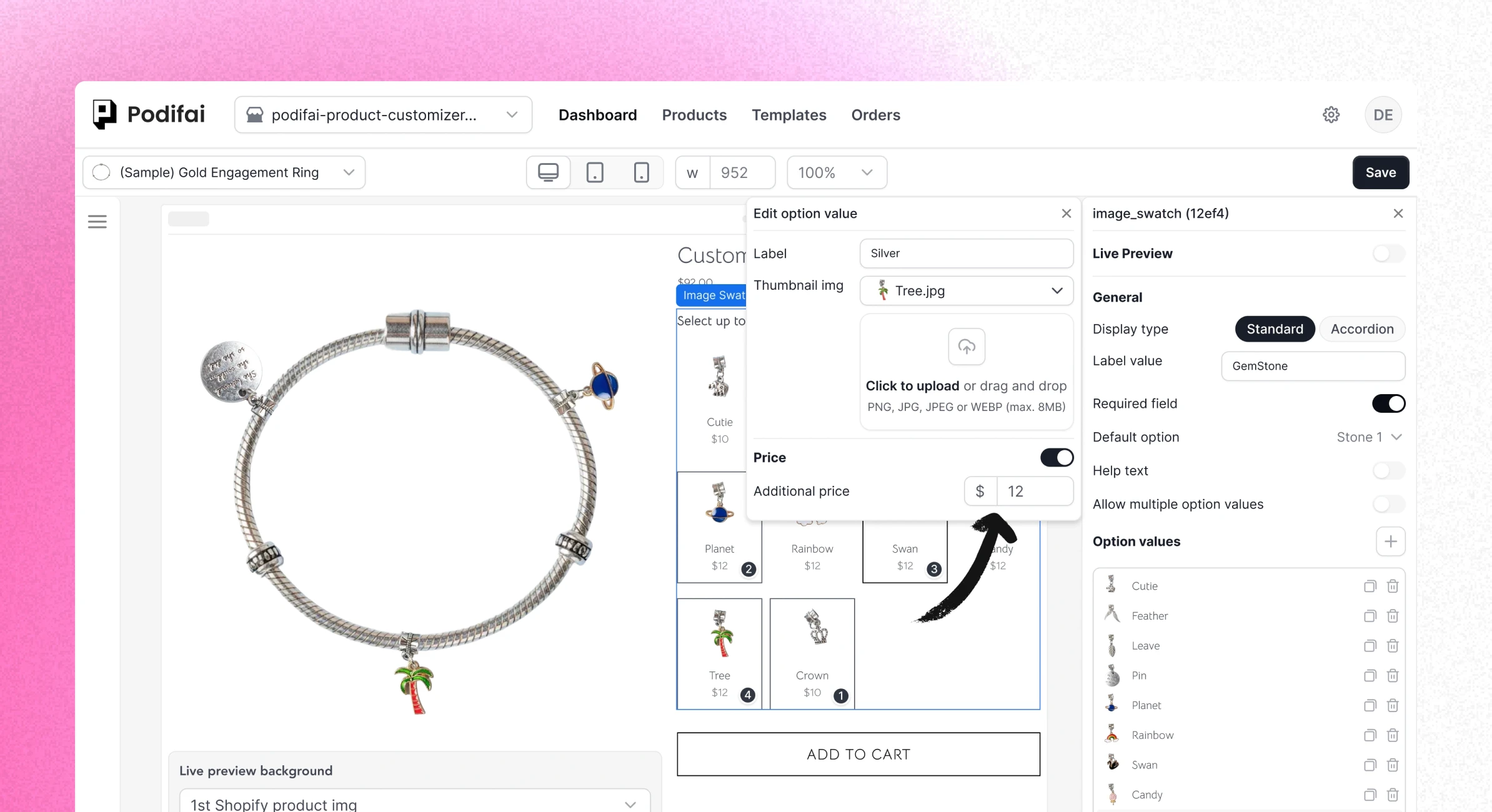
Direct answer
What is product configuration software?
Product evidence
See the controls behind a configured Shopify product
These product recordings show the configuration rules, option pricing, stock connection, and order handoff rather than relying on generic software illustrations.
Reveal only valid choices
Use conditional logic to show the next field only when it applies to the shopper's current selection.
Attach option-driven pricing
Assign a fixed surcharge or linked variant price and verify the amount beside the configured choice.
Connect stock-sensitive choices
Link an option value to Shopify variant inventory when the selected component or material has its own stock.
Review the saved configuration
Open the Podifai Orders tab to inspect the product, selected values, status, price, and live-preview image URL.
Choose the right model
Basic options software vs Podifai vs enterprise configuration software
The correct category depends on whether the store needs product-page personalization or sales and engineering configuration outside the normal Shopify checkout flow.
| Dimension | Basic options or form app | Podifai Shopify configuration | Enterprise configurator or CPQ |
|---|---|---|---|
| Best fit | Collecting fields and simple add-ons | Personalized and made-to-order Shopify products | Complex assemblies and sales-led products |
| Shopper input | Capabilities vary by app | Text, uploads, swatches, dropdowns, badges, and add-ons | Configured components, quantities, and technical requirements |
| Visual output | May be absent or available as an add-on | Layered 2D preview on one product canvas | May include 2D, 3D, AR, CAD, or multiple views |
| Rules | Field display rules vary by app and plan | Show or hide dependent product choices | Engineering, compatibility, approval, and quoting rules |
| Pricing | Add-on capability varies by app and plan | Fixed surcharges or linked Shopify variant prices | Formulas, quotes, contract pricing, or approvals |
| Inventory | Usually relies on the base Shopify product | Custom option stock or linked Shopify variant inventory | May connect to ERP, PIM, or manufacturing systems |
| Purchase flow | Usually standard Shopify checkout | Shopify checkout with readable configuration data | Checkout, quote request, or sales-assisted workflow |
| Production files | Usually not included | Not generated automatically | Available from some production-focused platforms |
Product configuration and CPQ capabilities vary by vendor, plan, and implementation. Confirm 3D, AR, quoting, ERP, PIM, manufacturing, and production-file requirements directly with each provider.
Podifai is designed for Shopify product-page configuration. It is not built for interactive 3D or AR, engineering validation, dealer portals, enterprise quoting, or automatic production-file generation.
Implementation workflow
Model the sellable product before adding configuration rules
Keep each layer responsible for the data it handles best, then test the same configuration through checkout and fulfillment.
- 01
Keep normal SKUs in Shopify
Use Shopify variants for the stocked base product, size, material, finish, or other choices that define a normal SKU.
- 02
Add shopper-entered options
Create the text, upload, swatch, dropdown, badge, and add-on fields required for personalization.
- 03
Configure preview, rules, price, and stock
Map visible choices to 2D layers, hide irrelevant fields, attach surcharges, and connect inventory where it matters.
- 04
Test the complete purchase flow
Verify the product page, cart, checkout, Shopify order, Podifai order details, prices, uploads, and stock behavior before launch.
After checkout
Keep the configuration readable after checkout
Podifai attaches text, colors, selected values, uploaded image URLs, and preview identifiers to the Shopify line item. Fixed add-on charges follow Shopify checkout, while production artwork and machine-ready files remain a separate merchant workflow.
Merchant proof
Merchants value a configuration workflow that stays usable
Verified Shopify App Store reviews covering live customization, simple setup, and real made-to-order products.
4.9 on the Shopify App Store · 24 reviewsThis app is AMAZING! So simple to use and the personalisation options are so much better than what's currently on the market. Not to mention the tech support! I had an issue with it displaying on my website because of my theme, and I got help instantly… it was done in a matter of hours, like in 1 hour! Yeah, its a game changer!
I run a custom apparel lab (DTF printing and embroidery) and Podifai has been exactly what I needed to offer personalization directly on my Shopify store. The live customizer works beautifully — customers can see their name, number, and logo on the garment in real time. What really stood out was the support… that level of founder-direct support is rare.
The app is great. One of the key strengths the developer should continue focusing on is simplicity. After comparing it with other apps on the market, I found that most competitors are overly complicated. This gives Podifai a strong opportunity to stand out and compete effectively by keeping the user experience simple and intuitive.
Continue exploring
Related Podifai pages
Continue with the focused Podifai pages and documentation for each part of this Shopify workflow.
Shopify product configurator
Review the Shopify-specific storefront-to-order configurator workflow.
Custom product builder
Follow the shopper-facing options, preview, pricing, and order flow.
Shopify product options
Configure fields, uploads, swatches, add-ons, and conditional choices.
Product visualization
Plan the layered 2D preview used for visible product choices.
Questions before setup
Product configuration software FAQ
Direct answers about Shopify fit, CPQ boundaries, 2D preview, inventory, order data, production files, and free eligibility.
Is product configuration software the same as a Shopify customizer app?
Not always. A Shopify customizer usually focuses on shopper-facing product pages, while the broader product configuration category can also include CPQ, quoting, engineering rules, dealer portals, 3D, AR, or manufacturing workflows.
When should a Shopify merchant use Podifai?
Use Podifai when the product needs custom options, layered 2D preview, conditional logic, price add-ons, optional inventory links, and readable order data inside the normal Shopify purchase flow.
Does Podifai replace Shopify variants?
No. Keep normal inventory-bearing SKU choices in Shopify variants. Use Podifai for shopper-entered personalization and optional components that should not require a separate variant for every possible combination.
Does Podifai support 3D, AR, or enterprise CPQ?
No. Podifai currently focuses on layered 2D configuration for Shopify product pages. Use a specialist platform for 3D models, augmented reality, engineering validation, dealer quoting, or enterprise CPQ.
Does Podifai generate production-ready files?
No. Podifai stores shopper choices and uploaded files for the order workflow, but it does not currently generate print-ready, SVG, DXF, CAD, or other machine-ready production files automatically.
Where does the configured product data appear after checkout?
Selected values and uploaded image URLs are attached to the Shopify line item. Merchants can review them in Shopify Admin and in the Podifai Orders tab.
Is Podifai product configuration software free?
Podifai has a Free forever plan for up to 3 custom products. Starter supports 30 products for $7.9/month, and Growth supports unlimited products for $15.9/month. Existing customers keep their current full access.

Start with Shopify-native product configuration
Start free with up to 3 custom products, or choose a paid plan from $7.9/month as your catalog grows.